RDP Robot
Description Automates a remote machine over Remote Desktop Protocol. This is the recommended type for production: the robot works in its own remote session, so your own desktop stays free.
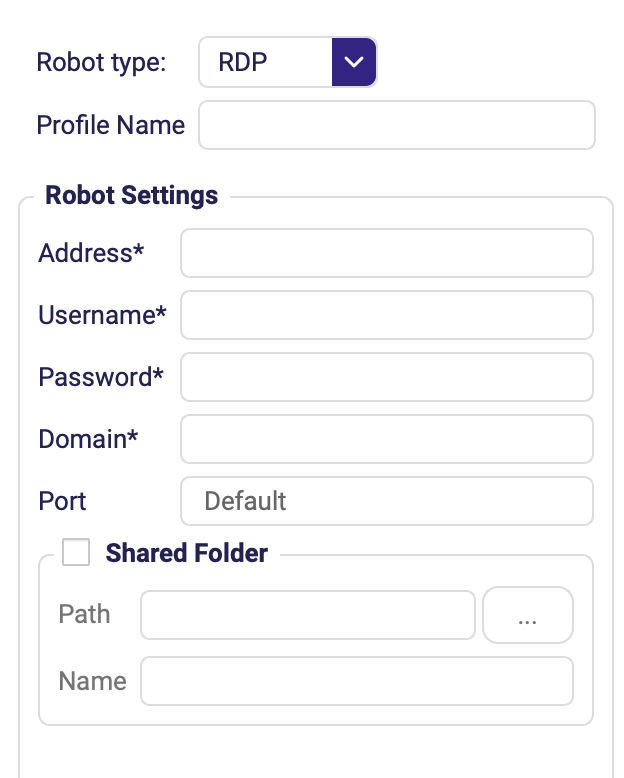
The screenshot shows the top of the form. Gateway, Connection File and the options described further down sit below the visible area — scroll the dialog to reach them.
Connection settings
Fields marked with * are required.
| Field | Description |
|---|---|
| Profile Name | Name under which this configuration is saved for reuse. |
Address * | Address of the remote machine. |
Username * | Login username on the remote machine. |
Password * | Login password. Store it in the Vault and reference it instead of typing it in plain text. |
Domain * | Windows domain of the account. |
| Port | RDP service port. Leave Default unless your server listens elsewhere. |
| Connection File | Load the connection details from an existing .rdp file instead of filling the fields by hand. |
Shared folder
Tick Shared Folder to redirect a local folder into the remote session — that is how files move between the two machines. The folder also shows up as Shared folder (RDP) in the Files panel.
| Field | Description |
|---|---|
| Path | Local folder to share with the remote session. |
| Name | Name the share appears under on the remote machine. |
Gateway
Fill this section in only when the remote machine is reachable through an RD Gateway.
| Field | Description |
|---|---|
| Address | Gateway host. |
| Username / Password / Domain | Credentials for the gateway. |
| Port | Gateway port; Default in most deployments. |
Other options
| Field | Description |
|---|---|
| Enable unicode keyboard | Sends characters as Unicode instead of scan codes. Turn this on when typing accented or non-Latin characters produces wrong letters. |
| Enable autoreconnect | Reconnects automatically if the RDP session drops mid-run. |
| Extra options | Additional raw RDP options for edge cases. |
Transfer File To Remote Machine and Get File From Remote Machine (Files → RDP) move files in and out of the session without you touching the shared folder manually.