AI Actions
The AI group is new since 0.14.2. It covers two different jobs: generating parts of a scenario from a description, and extracting structured data from unstructured content.
These actions send content to the Aiviro AI service. Do not point them at data your organization is not allowed to process externally, and use Result is secret / Sensitive Data on the surrounding actions when handling personal data.
Prompt Actions
A container action that builds its own child actions from a plain-language description. Describe what should happen, and the AI generates the actions inside the block; you then review, edit and re-order them like any hand-built section.
Because the generated actions stay visible in the Commands tree, the AI is only a starting point — nothing runs that you have not seen.
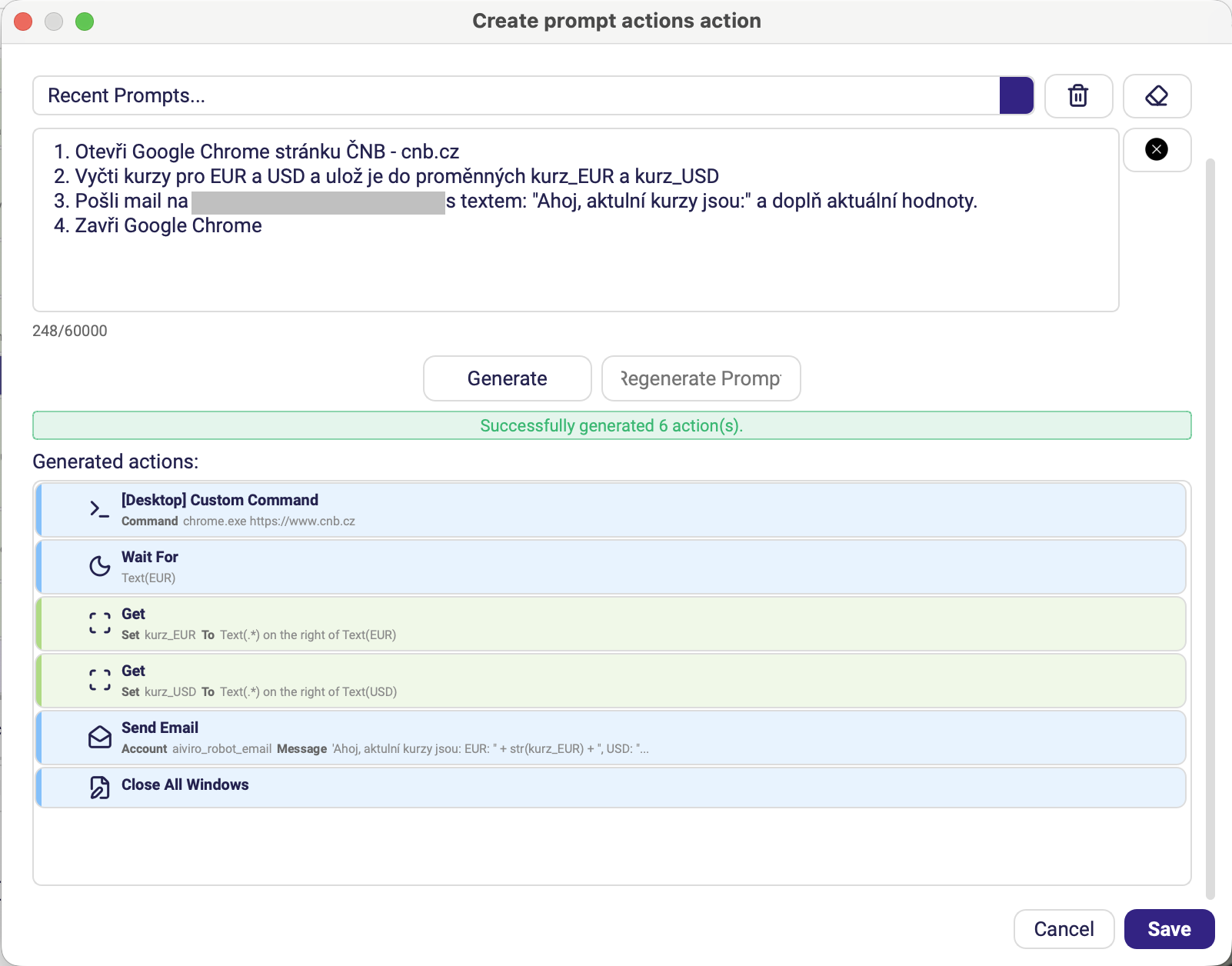
Generated actions is a preview: the list shows what the AI produced, and pressing Save drops those actions into the Commands tree as the children of the block, where each one can be opened and edited on its own. Recent Prompts at the top recalls a prompt you have used before, and Regenerate Prompt asks for a fresh attempt at the same description.
Sometimes the AI adds an action such as Click or Get without finding the element it should act on. Such an action is added with Run Action set to Disabled, and a warning names the action and the missing field. Pick the element by hand and enable the action again. If an action with an empty target runs anyway, it fails straight away with a message naming the missing field, instead of with an unclear error later in the run.
| Parameter | Description |
|---|---|
| Title | Label shown on the block in the tree. |
| Prompt | Description of what the generated actions should do. |
The block remembers the prompt the current children were generated from. Re-running generation after editing the prompt replaces the children, so keep hand-tuned actions outside the block — or copy them out before regenerating.
AI Read
Extracts structured fields from a document, a screen, the clipboard or a variable. Where Get reads one value from one place, AI Read takes a whole page of unstructured content and returns the fields you asked for.
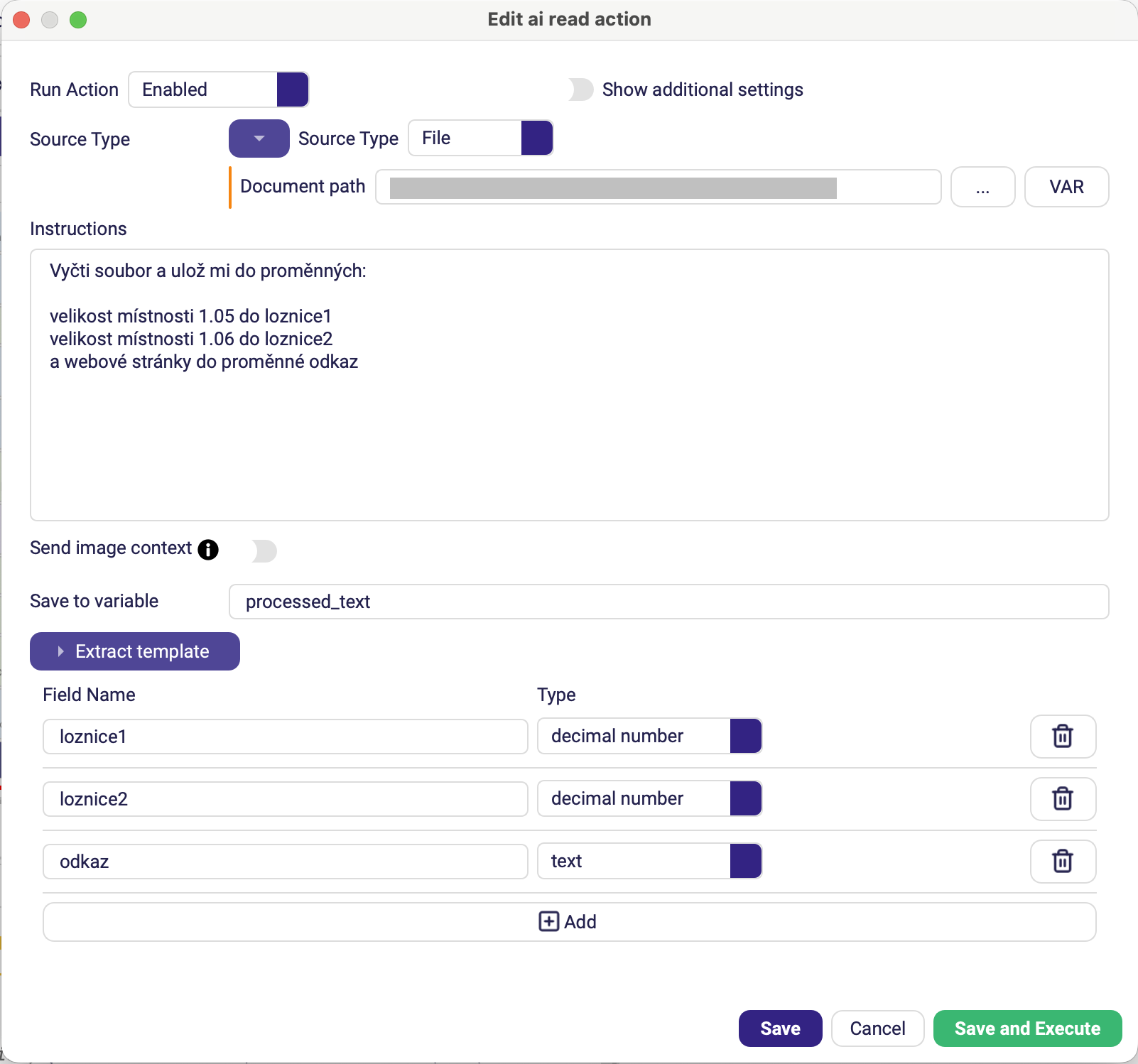
Here Instructions and Extract template name the same three fields — the instructions say in words what to look for, the template fixes the name and type of each returned value.
| Parameter | Description |
|---|---|
| Source Type | Where the content comes from: Screen (what the robot currently sees), File (a path you supply), Clipboard, or Text (the contents of a variable). Choosing File adds a Document path field with a file picker. |
| Instructions | What to extract, in plain language. You can name the target fields here too, one per line — e.g. "Read the applicant's details from the document: name = person_name, surname = person_surname". Enter starts a new line; Ctrl+Enter saves the action and runs it. |
| Extract template | Collapsible table of the fields to return — Field Name and Type per row, with Add to append another and a bin icon to drop one. This defines the shape of the result. |
| Save to variable | Variable that receives the extracted data. Default processed_text. |
| Send image context | Also sends the image to the model, which improves results on documents where layout carries meaning — tables, forms, invoices. Default off. |
| Custom JSON schema | An explicit JSON schema for the result, for cases where Extract template is not expressive enough. Optional. (Advanced options) |
Name the fields in Extract template the way you want to use them later — the result
is a structure keyed by those names, so invoice_total reads better in the rest of the
scenario than field_2.
Process Invoice
Reads an invoice PDF and returns its parsed content — header data and line items — without you defining extraction rules.
/img/editor/actions/ai/process_invoice.pngCapture: the Process Invoice form, and ideally the Variables panel showing
the parsed structure it produced.
Use an invented invoice: the supplied shot was rejected because the expanded
invoice_insportline structure held a real supplier's invoice — company name, bank, invoice
number and amounts were all readable. Run the action on a made-up invoice before capturing.
Note: the old image is actions/files/pdf_reader.png — the action was renamed from
Aiviro PDF Reader and moved from Files to AI, so the screenshot needs both a new
name and a new capture.
| Parameter | Description |
|---|---|
| PDF File Path | Invoice PDF to read. |
| Save to variable | Variable that receives the parsed result. |
Which one should I use?
| Task | Action |
|---|---|
| Read one known value from a known place on screen | Get (Tools) |
| Read several fields from a document or a busy screen | AI Read |
| Read a standard invoice | Process Invoice |
| Pull fixed values out of a PDF with positional rules | Extract PDF custom (Files) |
| Draft a section of the scenario for you | Prompt Actions |